LIVE DEMO: https://mealvoro-mobile-app.poyrazn8n.workers.dev
A React Native + Expo TypeScript app for a single restaurant’s pickup preorders: menu discovery, rule-checked dish customisation, an integer-cent docket and time-zone-aware pickup slots, with orders saved on the device as clearly labelled local demo orders.
Mealvoro · native-mobile-app-template · React Native source code
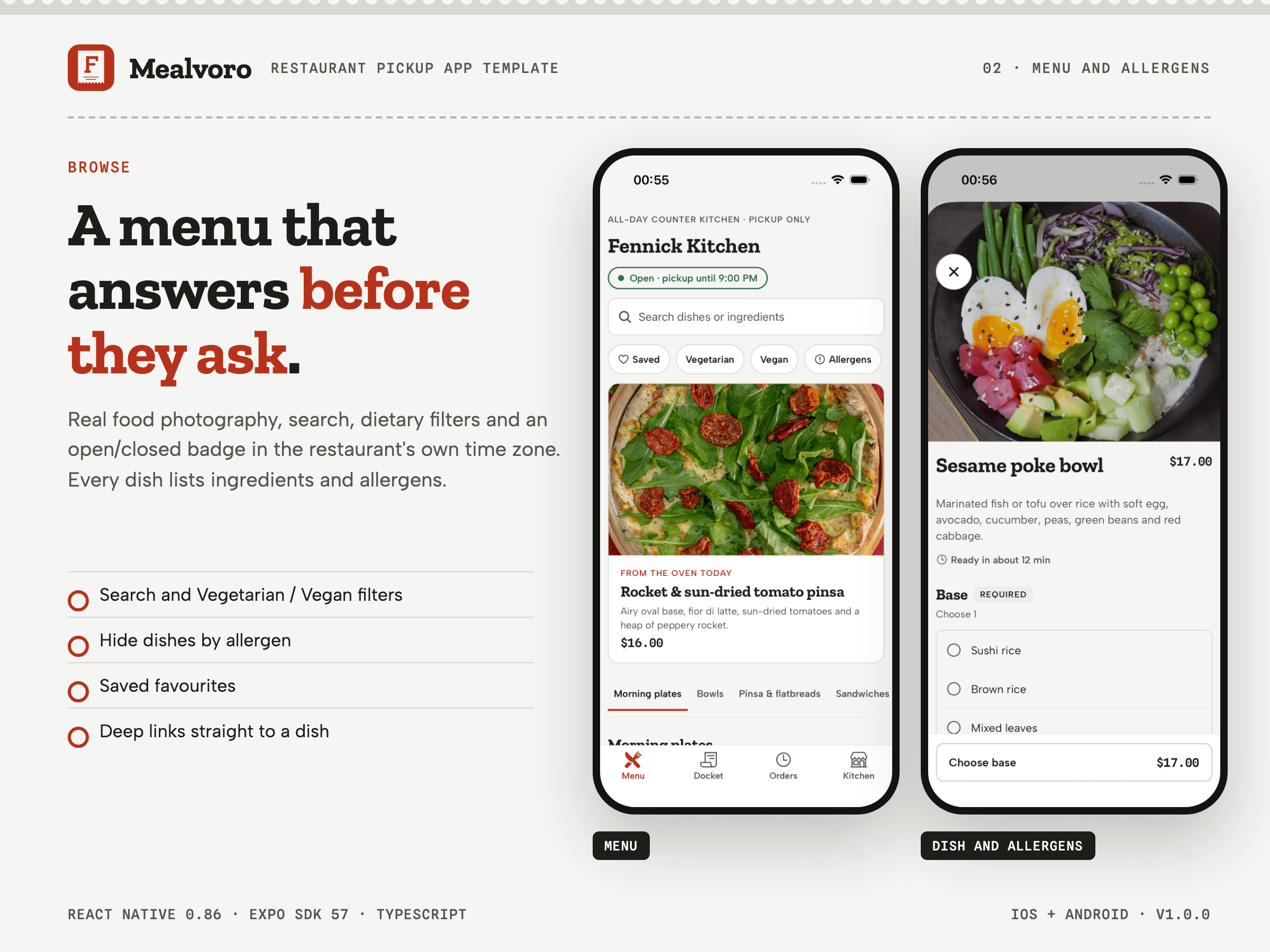
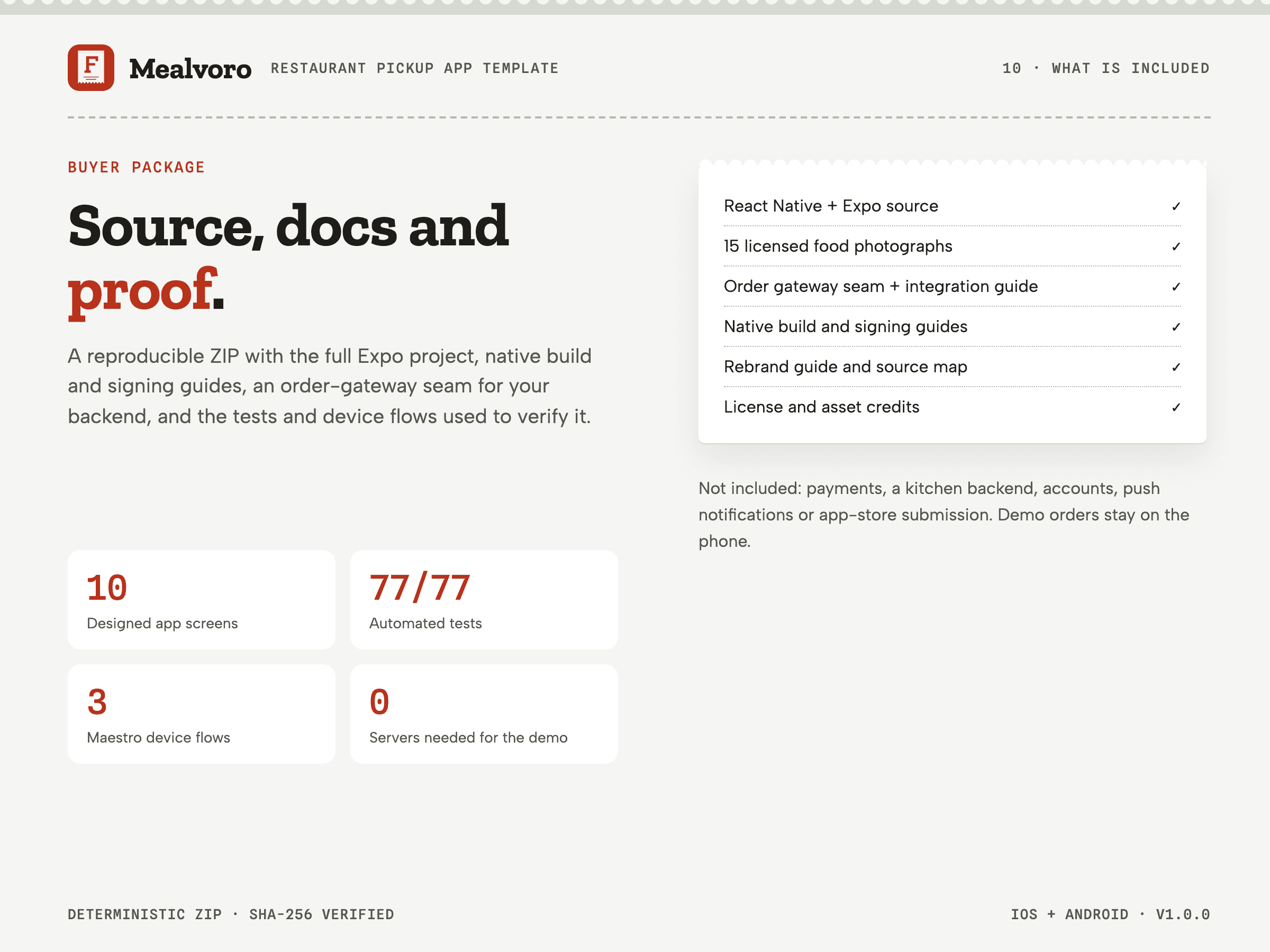
10 designed app screens (welcome, menu, dish options, docket, pickup checkout, order ticket, order history, kitchen info and settings, photo credits, not-found) plus an allergen filter sheet
Native iOS and Android source code (native_frontend edition) with demo data and documented integration seams; no backend, payment processing, accounts or live order status is included.
WHO IT IS FOR
- React Native developers building a branded order-ahead app for one restaurant, café or counter kitchen
- Small studios that want working menu, modifier, cart and pickup-slot rules before connecting a POS
Required skills: Comfortable with React Native, Expo and TypeScript, and with running iOS Simulator or Android Emulator builds.
Not ideal for: Buyers who need a finished, store-ready app with payments, accounts and a live kitchen backend included; Multi-restaurant delivery marketplaces with couriers, live tracking or vendor apps; Buyers who cannot run Xcode or Android Studio tooling (or an equivalent hosted build service) to produce app binaries.
WHAT YOU GET
10 designed app screens (welcome, menu, dish options, docket, pickup checkout, order ticket, order history, kitchen info and settings, photo credits, not-found) plus an allergen filter sheet
- mealvoro/
- mealvoro/mobile/src/ (Expo Router screens, components, domain rules, state, services, theme, config, copy and menu data)
- mealvoro/mobile/__tests__/, mealvoro/mobile/test-support/ and mealvoro/mobile/e2e/ (Jest tests, the fixed test kitchen and Maestro flows)
- mealvoro/mobile/assets/ (brand icon and splash sources, 15 dish photographs)
- mealvoro/mobile/app.config.ts
- mealvoro/mobile/package.json
- mealvoro/mobile/package-lock.json
- mealvoro/showcase/ (the static review page)
- mealvoro/README.md
- mealvoro/START-HERE.md
- mealvoro/BUYER-README.md
- mealvoro/BUYER-SCOPE.md
- mealvoro/LICENSE.txt
- mealvoro/ASSET-CREDITS.md
- mealvoro/Documentation/ (media manifest and third-party media)
- mealvoro/docs/ (customise, integration, native build, source map)
- Menu discovery: Sectioned menu with a sticky section rail, search across names and ingredients, vegetarian/vegan filters, favourites and hiding dishes that contain chosen allergens; empty results explain how to clear filters. [included-working]
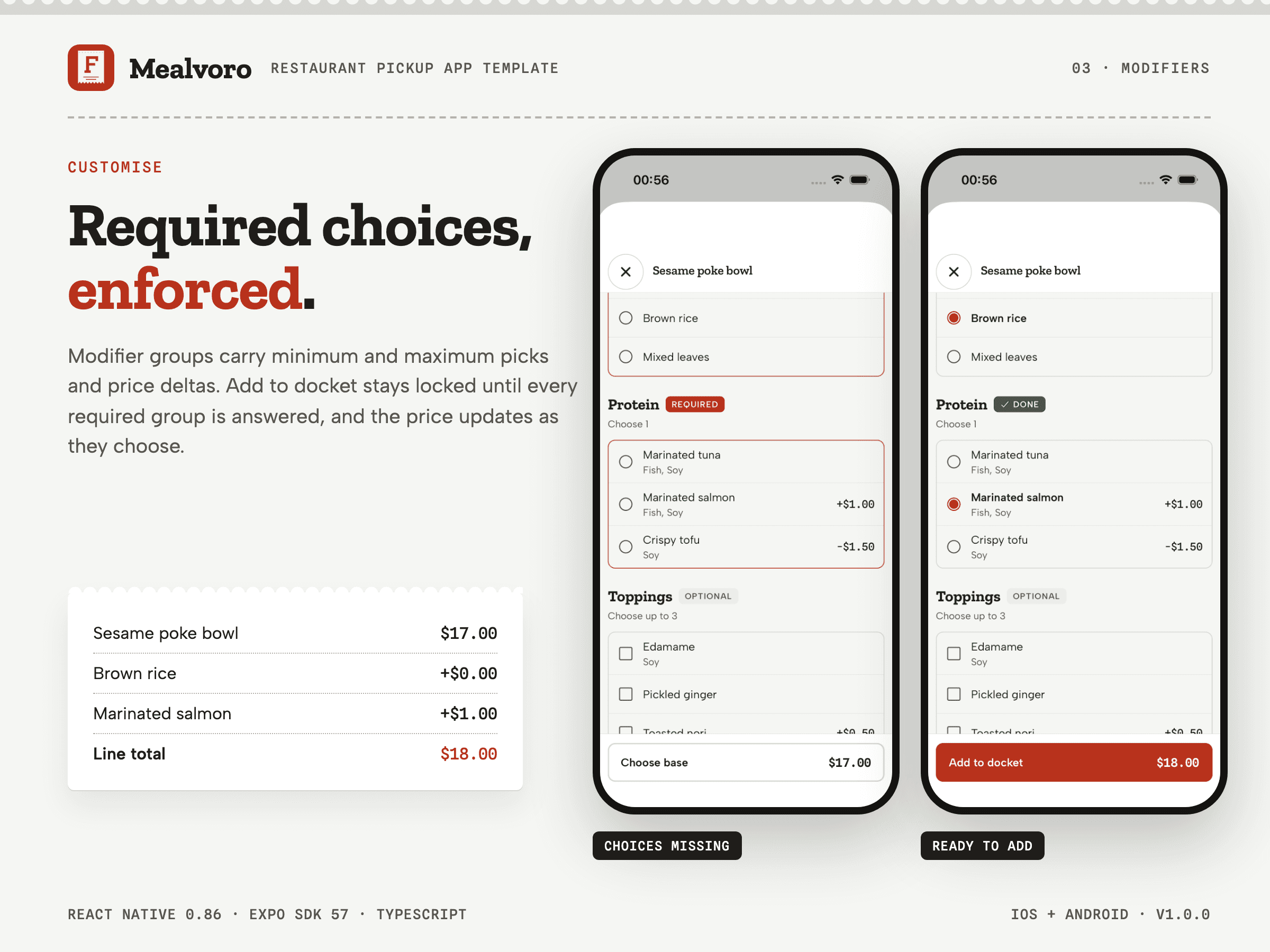
- Dish customisation: Required and optional modifier groups with min/max rules, sold-out options, price deltas (including reductions), quantity and a kitchen note; the add button names the missing choice and jumps to it. [included-working]
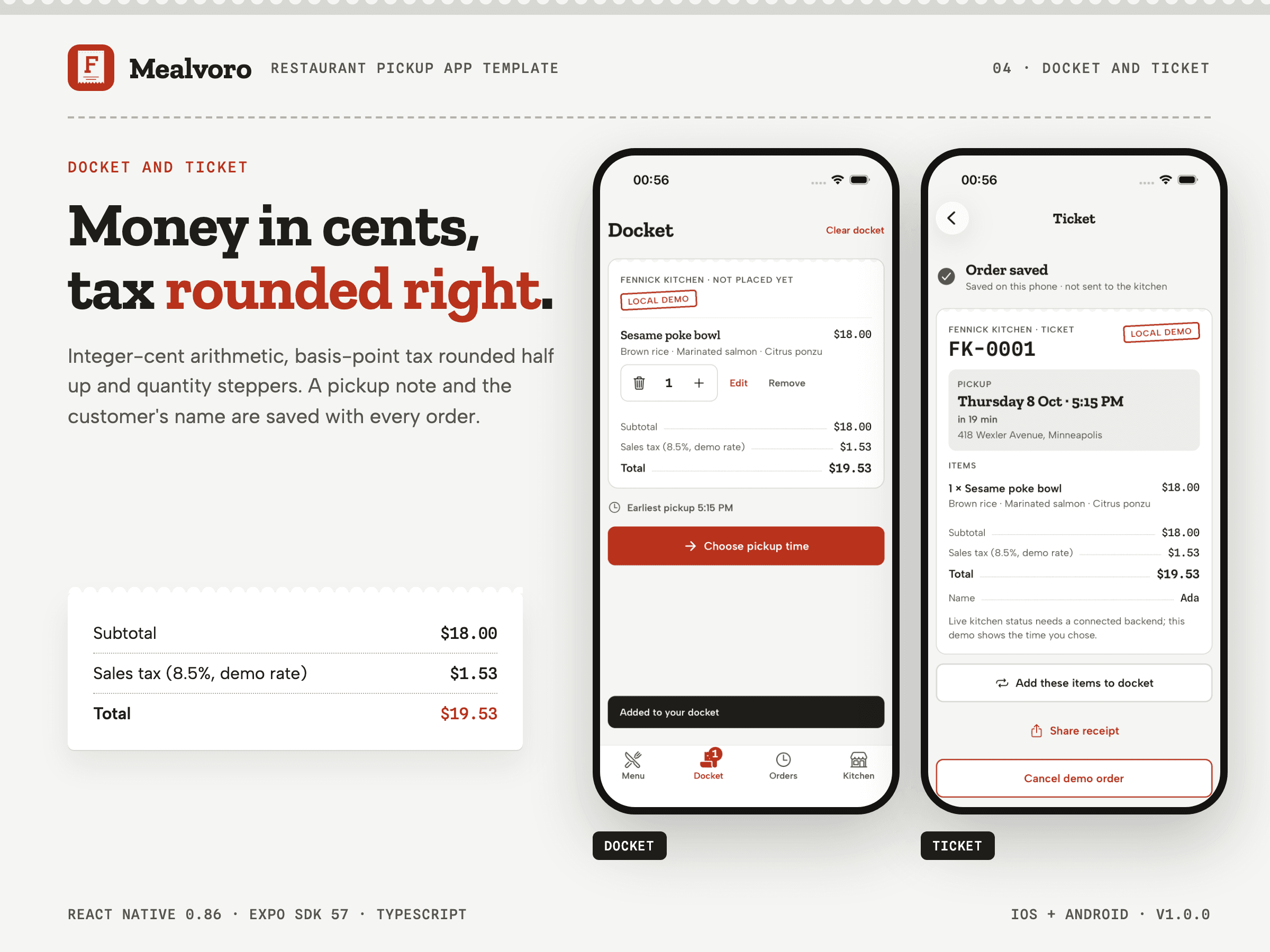
- Docket (cart): Identical lines merge, lines can be edited, re-quantified or removed with undo; totals use integer cents with sales tax applied once to the subtotal and rounded half up. [included-working]
- Opening hours in the kitchen time zone: Open/closed state, next opening time and the weekly hours table are computed in the restaurant’s IANA time zone, including daylight-saving changes and closed dates. [included-working]
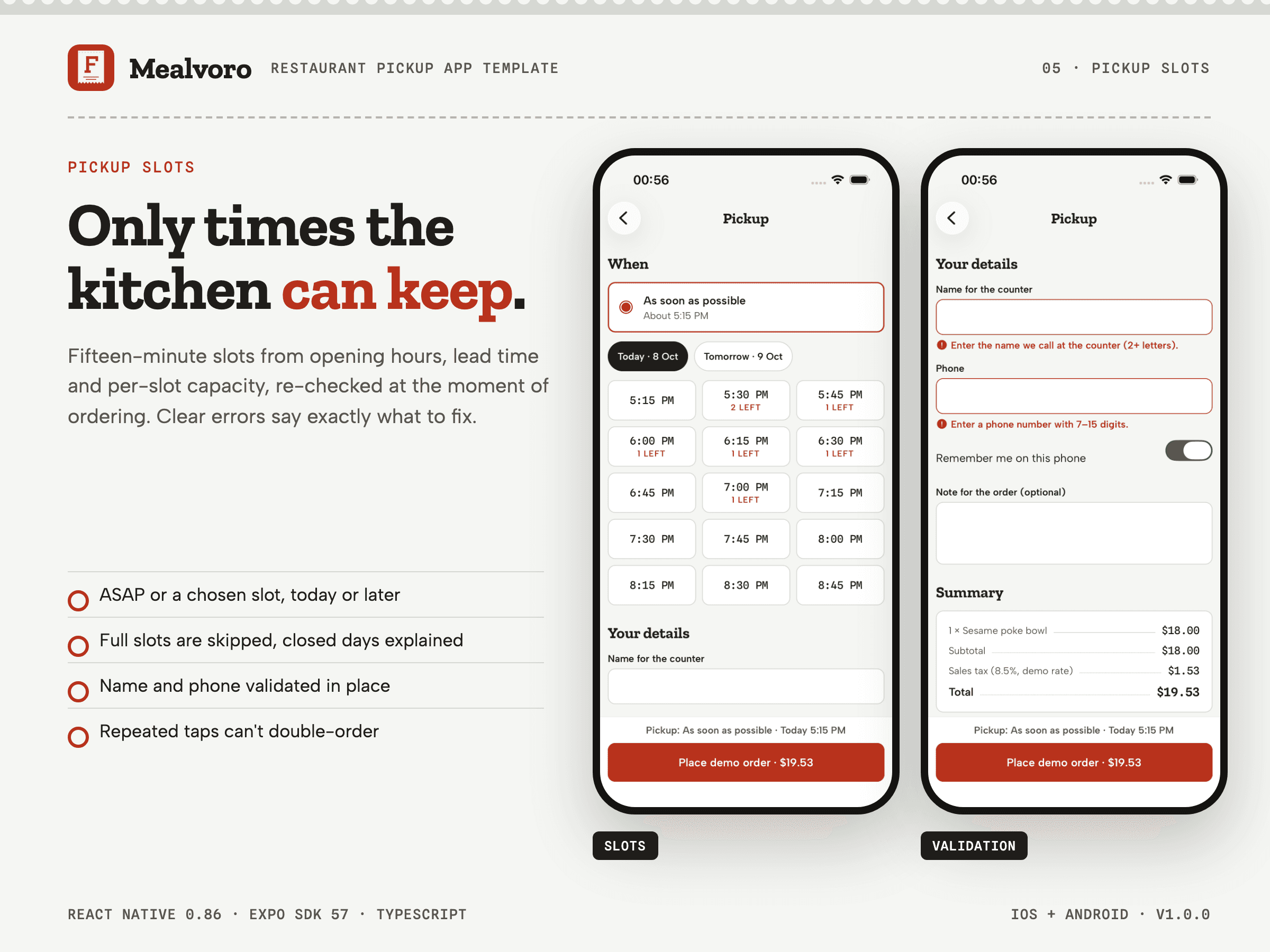
- Pickup slot rules: 15-minute slots for today and tomorrow (configurable) that respect opening hours, last-slot cut-off, preparation lead time, breakfast-only service windows and per-slot capacity; the chosen slot is re-checked at the moment of ordering with a suggested alternative. [included-working]
- Simulated slot capacity: Other customers’ orders are simulated deterministically so Almost full and Full states are visible; orders placed on the device count for real. Replace with availability from your POS. [frontend-demo]
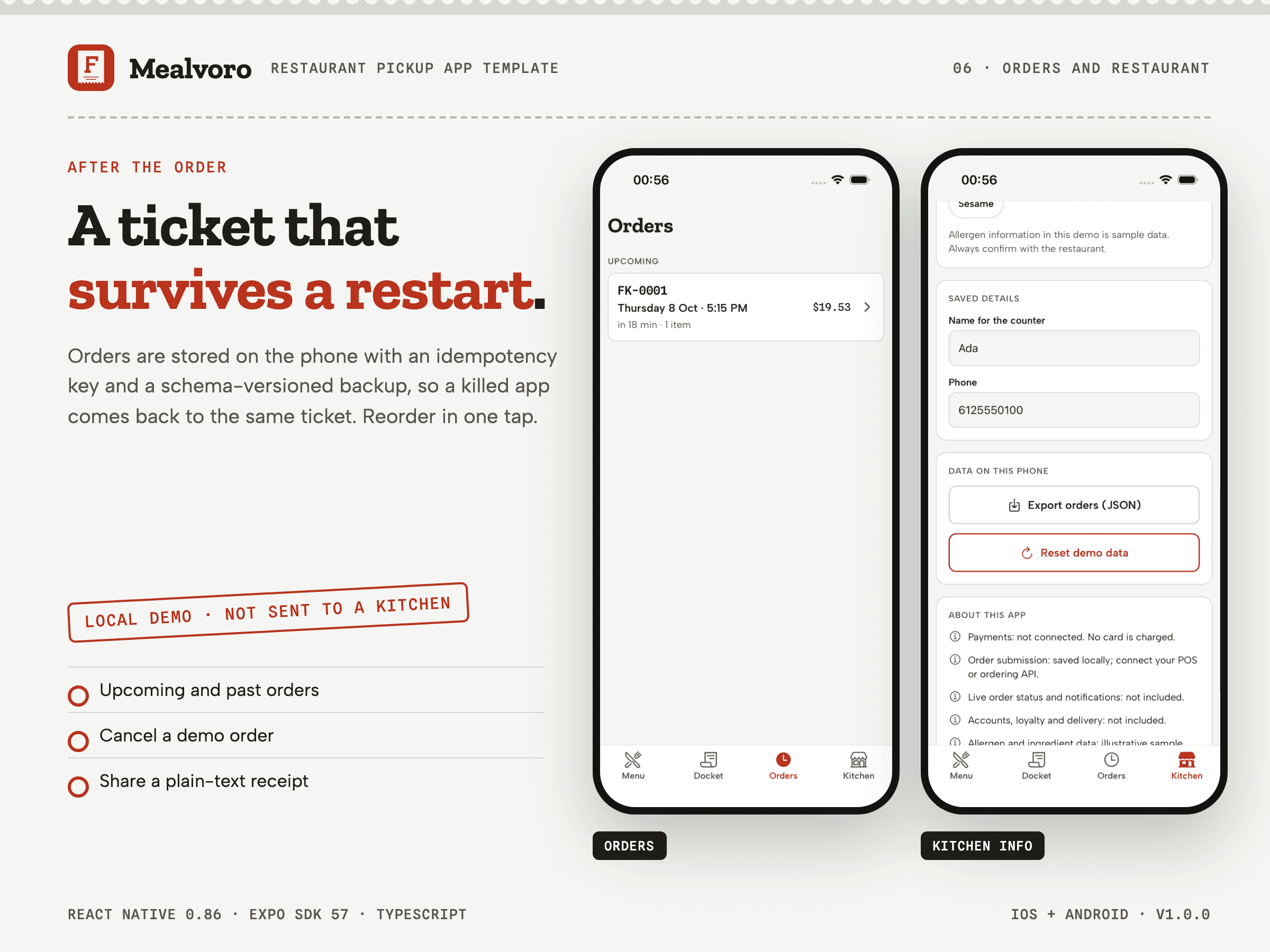
- Local demo order: Placing an order validates name and phone, creates a ticket number and saves the order on the device only, clearly labelled LOCAL DEMO; it is not sent to a kitchen and no payment is taken. [frontend-demo]
- Order history and reorder: Upcoming and past orders with pickup countdowns, a shareable text receipt, cancel (kept as cancelled) and reorder that skips items the menu no longer supports. [included-working]
- On-device persistence and restore: Docket, checkout draft, favourites, preferences, saved details and orders survive restarts (AsyncStorage, versioned schema); unreadable data is set aside instead of crashing; reset and JSON export are included. [included-working]
- Appearance and preferences: System, light or dark appearance, 12/24-hour clock, saved name and phone, and allergen exclusions. [included-working]
- Accessibility semantics: Roles, labels and states on controls, 44–48 pt touch targets, system font scaling, screen-reader announcements for changes, reduced-motion-aware animation and measured colour contrast in both themes. [included-working]
WHAT WORKS IMMEDIATELY
- Menu discovery: Sectioned menu with a sticky section rail, search across names and ingredients, vegetarian/vegan filters, favourites and hiding dishes that contain chosen allergens; empty results explain how to clear filters. [included-working]
- Dish customisation: Required and optional modifier groups with min/max rules, sold-out options, price deltas (including reductions), quantity and a kitchen note; the add button names the missing choice and jumps to it. [included-working]
- Docket (cart): Identical lines merge, lines can be edited, re-quantified or removed with undo; totals use integer cents with sales tax applied once to the subtotal and rounded half up. [included-working]
- Opening hours in the kitchen time zone: Open/closed state, next opening time and the weekly hours table are computed in the restaurant’s IANA time zone, including daylight-saving changes and closed dates. [included-working]
- Pickup slot rules: 15-minute slots for today and tomorrow (configurable) that respect opening hours, last-slot cut-off, preparation lead time, breakfast-only service windows and per-slot capacity; the chosen slot is re-checked at the moment of ordering with a suggested alternative. [included-working]
- Order history and reorder: Upcoming and past orders with pickup countdowns, a shareable text receipt, cancel (kept as cancelled) and reorder that skips items the menu no longer supports. [included-working]
- On-device persistence and restore: Docket, checkout draft, favourites, preferences, saved details and orders survive restarts (AsyncStorage, versioned schema); unreadable data is set aside instead of crashing; reset and JSON export are included. [included-working]
- Appearance and preferences: System, light or dark appearance, 12/24-hour clock, saved name and phone, and allergen exclusions. [included-working]
- Accessibility semantics: Roles, labels and states on controls, 44–48 pt touch targets, system font scaling, screen-reader announcements for changes, reduced-motion-aware animation and measured colour contrast in both themes. [included-working]
WHAT NEEDS INTEGRATION
- payments: No payment processor or card form. Checkout says so at the button; connect your provider’s SDK through the order gateway. [not-included]
- auth: No sign-in or accounts; name and phone are stored on the device only. [not-included]
- email: No email or SMS confirmation is sent. [not-included]
- cms: The menu is a typed local file (src/data/menu.ts) to be mapped from your POS or menu API. [not-included]
- orders: Orders are saved on the device as LOCAL DEMO orders. Sending them to a kitchen or POS requires implementing the OrderGateway adapter. [integration-required]
- backend: No server, database or hosted API is included or required to run the demo. [not-included]
- mlsCrm: Not applicable to a restaurant ordering app. [not-included]
WHAT IS NOT INCLUDED
- Payments: No payment processor is connected and no card form is included. [not-included]
- Live order status and notifications: No live kitchen status, push notifications or delivery tracking; the receipt shows the chosen pickup time. [not-included]
- Accounts and loyalty: No sign-in, accounts or loyalty programme. [not-included]
- Fennick Kitchen, its menu and its allergen data are a fictional demo brand and illustrative sample data; replace them with the restaurant's own verified content before shipping.
- Orders are saved on the phone as local demo orders: no payment, POS or kitchen backend, accounts, live order status or push notifications are included; connect your own through src/services/orderGateway.ts.
- No App Store or Google Play listing, signing identity or developer account is included; you build, sign and submit the app under your own accounts.
- The live demo is a static showcase of real app captures and install notes; the app itself runs on an iOS Simulator, an Android emulator or a device, not in a browser.
- English interface copy only; multilingual UI and RTL have not been validated.
- A person-driven VoiceOver or TalkBack walkthrough was not performed; accessibility was checked with Apple's on-device audit and the Android accessibility tree.
CUSTOMIZATION WORKFLOW
- Open mobile/ and install dependencies with npm ci (Node.js 20.19 or newer).
- Run the tests (npm test), then start on a simulator or emulator with npx expo run:ios or npx expo run:android.
- Rebrand in src/config/brand.json, src/config/restaurant.ts, src/data/menu.ts and assets/brand (see docs/CUSTOMIZE.md).
- Replace the demo photography and illustrative allergen data with the restaurant’s own verified content.
- Connect your POS or ordering API and a payment provider through src/services/orderGateway.ts (see docs/INTEGRATION.md).
- Set your own bundle identifiers and signing, then build release binaries (see docs/NATIVE_BUILD.md).
DELIVERY AND INSTALL
- mealvoro-v1.0.0.zip · version 1.0.0
Node.js 20.19+ (verified with 24.21); Xcode 27 for iOS (deployment target 16.4); Android SDK 36 with JDK 17 for Android (minSdk 24). Open mealvoro.
Install: cd mobile && npm ci
Build: cd mobile && npm run check && npx expo run:ios (or npx expo run:android)
Lockfile: mobile/package-lock.json. Package manager: npm.
LICENSE
LICENSE — Webloomery Template License v1.0 (effective 26 September 2026)
- One purchase, one end product: build one website or application for yourself or for one client.
- Modify the source for that end product. Its development, staging and production copies count as one end product.
- Team members and contractors on that end product may use the files, only for it.
- You may hand the finished project and the customized source it needs to that one client; the Template is then not reused for anyone else.
- Each additional website, application, end product or client needs another purchase.
- Not allowed: reselling, sharing, sublicensing or publicly publishing the Template source; turning it into a template, builder, code generator or reusable client-production system; reselling its components or assets separately.
- Third-party fonts, photographs and other assets keep their own licenses, listed in ASSET-CREDITS.md.
- Support and updates are separate from the license.
The full license text is included as LICENSE.txt in the download and published at https://webloomery.com/legal/license.
SUPPORT BOUNDARY
- Package installation, the documented build commands and the documented template behavior.
Excluded: Custom development, backend/POS/payment integration, app store submission and signing setup..
No guaranteed response time.
No fixed support period is promised.
ASSET CREDITS
15 dish photographs licensed from Pexels and recorded with source, licence and credit in Documentation/media-manifest.json and THIRD_PARTY_MEDIA.md; no AI-generated images. The app icon, Android adaptive icons and splash mark are the original docket mark drawn for this template (SVG sources with PNG exports). Zilla Slab, Albert Sans and Spline Sans Mono (SIL Open Font License 1.1), Ionicons via @expo/vector-icons (MIT) and the npm dependencies keep their own licenses.
Read ASSET-CREDITS.md. Third-party materials retain their own licenses. Demo brands and content must be replaced before launch.