LIVE DEMO: https://taskavyn-mobile-app.poyrazn8n.workers.dev
Native iOS and Android day-planner source: capture and prioritize tasks, place them on a time ruler that flags overlaps and work that ran past, measure the day against a focus capacity, and run focus sessions that keep time from timestamps.
Taskavyn · native-mobile-app-template · React Native source code
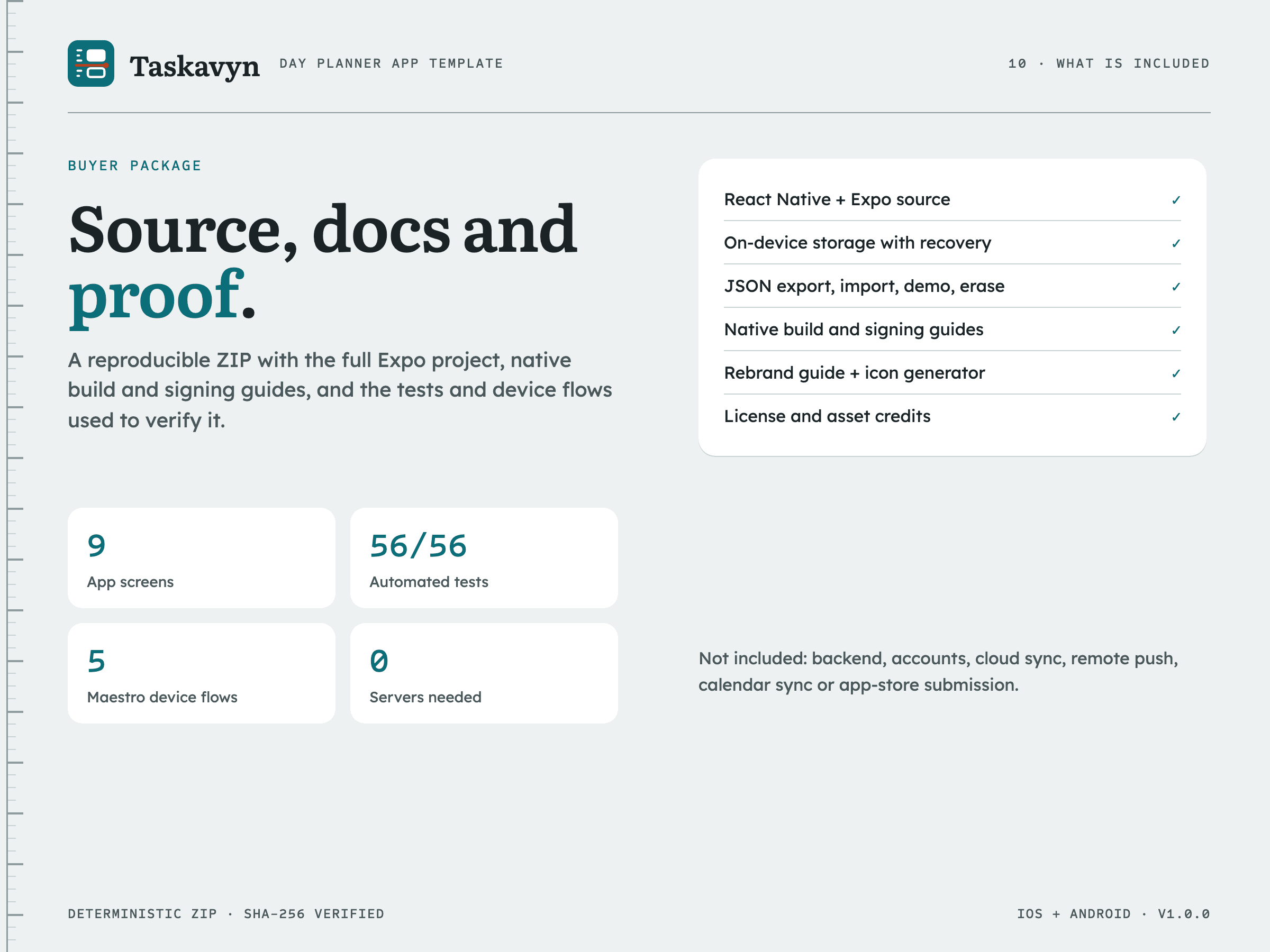
9 designed app screens (onboarding, Today, Inbox, Focus, Review, task editor, place-on-ruler, Settings and a not-found screen)
React Native 0.86 + Expo SDK 57 + TypeScript source for iOS and Android with on-device storage only. No backend, account, calendar sync, remote push or app-store listing is included.
WHO IT IS FOR
- React Native developers who want to launch their own branded day-planner or focus app
- Small studios that need a working, local-first planner client to connect to their own backend later
Required skills: Comfortable with React Native, Expo and the iOS/Android build tools (Xcode, Android Studio).
Not ideal for: Teams that need calendar sync, shared projects, accounts or a hosted backend out of the box; Buyers looking for a website, landing page or web app template; Buyers without macOS who expect to build the iOS app locally (a Mac with Xcode or a cloud build service is required).
WHAT YOU GET
9 designed app screens (onboarding, Today, Inbox, Focus, Review, task editor, place-on-ruler, Settings and a not-found screen)
- taskavyn/
- taskavyn/app/ (Expo Router screens)
- taskavyn/src/ (domain logic, state, services, components, theme, config, copy and demo data)
- taskavyn/__tests__/ and taskavyn/.maestro/ (Jest tests and Maestro device flows)
- taskavyn/assets/brand/ and taskavyn/scripts/generate-icons.mjs
- taskavyn/brand.config.js and taskavyn/app.config.ts
- taskavyn/package.json
- taskavyn/package-lock.json
- taskavyn/README.md
- taskavyn/START-HERE.md
- taskavyn/BUYER-README.md
- taskavyn/BUYER-SCOPE.md
- taskavyn/LICENSE.txt
- taskavyn/ASSET-CREDITS.md
- taskavyn/docs/ (rebranding, data, accessibility, integrations, native builds, changelog, source map)
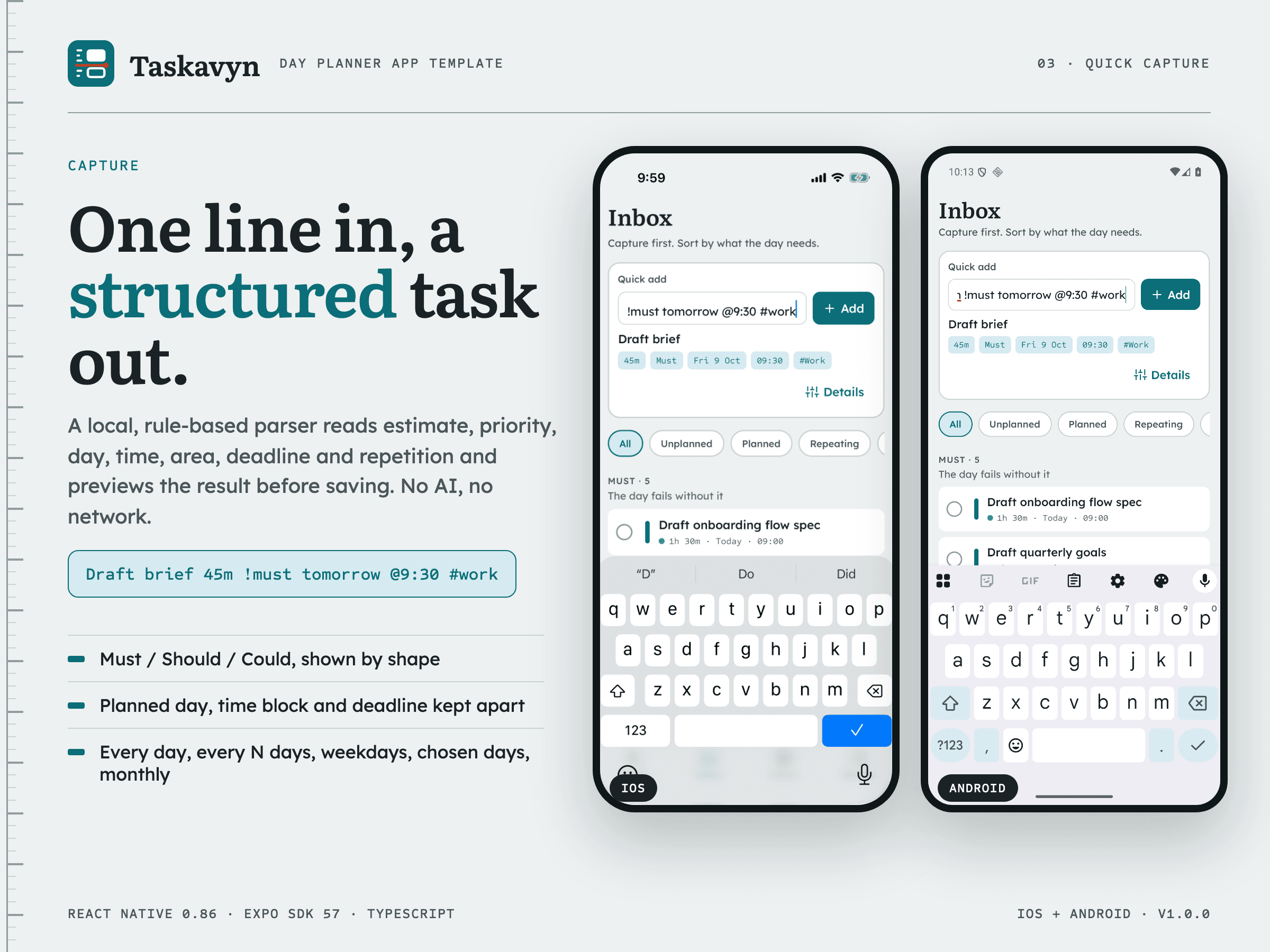
- Quick capture parser: A local, rule-based parser turns one line (for example "Draft brief 45m !must tomorrow @9:30 #work") into estimate, priority, day, time, area, deadline and recurrence, with a live preview before adding. It is not AI and makes no network call. [included-working]
- Must / Should / Could priorities: Tasks are grouped by priority in the Inbox and marked by shape (solid, outlined, dashed) as well as colour everywhere. [included-working]
- Day time ruler: Placed tasks render as blocks sized by duration on a ruler with 15-minute ticks, a daylight band and a now line; overlapping blocks sit side by side. [included-working]
- Overlap and ran-past handling: Overlapping open blocks and blocks whose time has passed are labelled in words and icons and can be fixed with one tap: next free slot, 15 minutes earlier or later, another time, tomorrow or back to the inbox. [included-working]
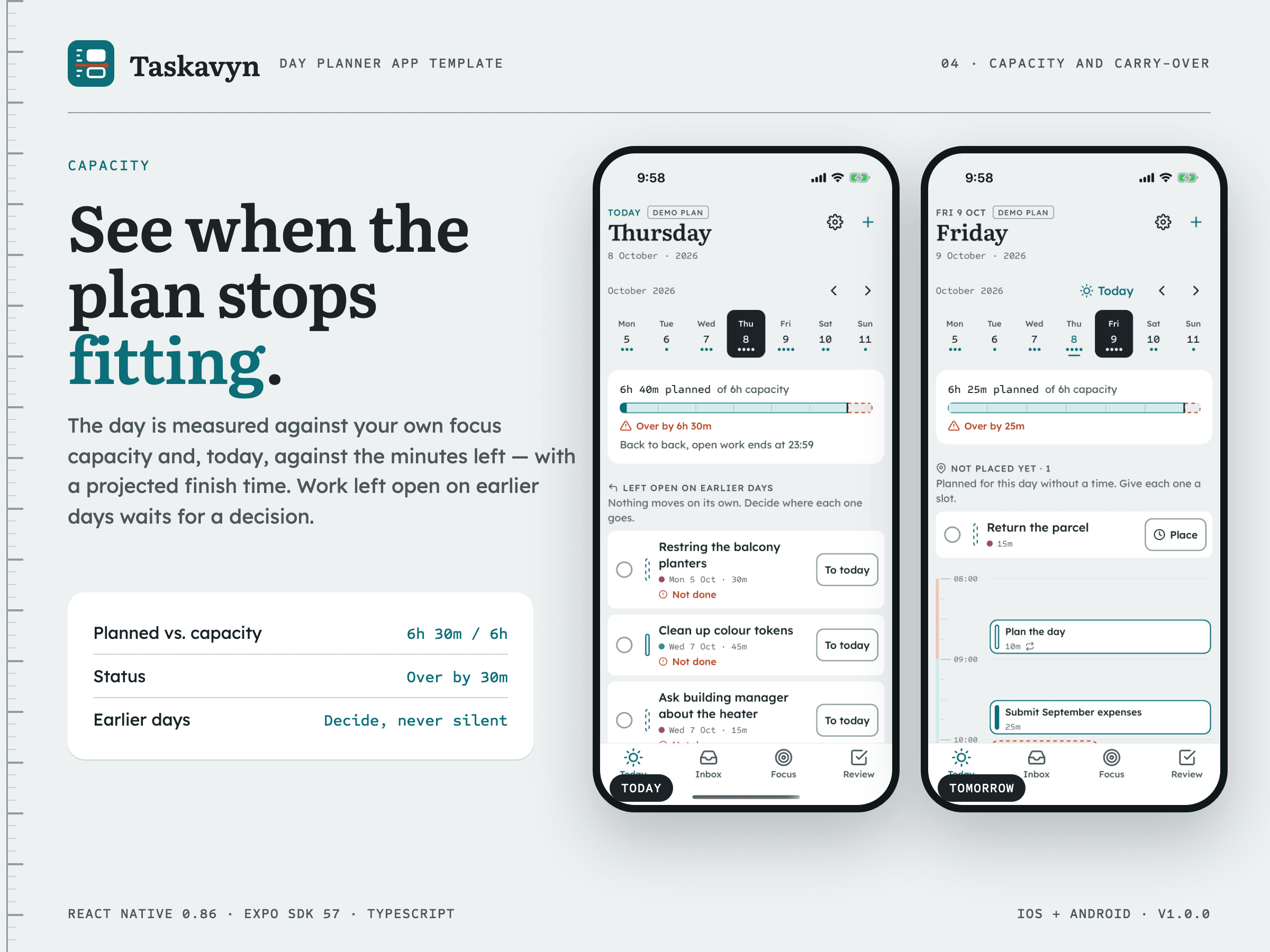
- Capacity ruler: The day's planned minutes are measured against a personal focus capacity and, on the current day, against the minutes left, with a projected finish time. [included-working]
- Recurring tasks: Every day, every N days, weekdays, chosen weekdays and monthly (clamped to the month's last day); each day can be done, skipped, moved or placed at its own time without changing the series. [included-working]
- Explicit carry-over: Unfinished one-off work from earlier days is listed until the person moves it to today, tomorrow or the inbox, completes it or lets it go; nothing moves silently. [included-working]
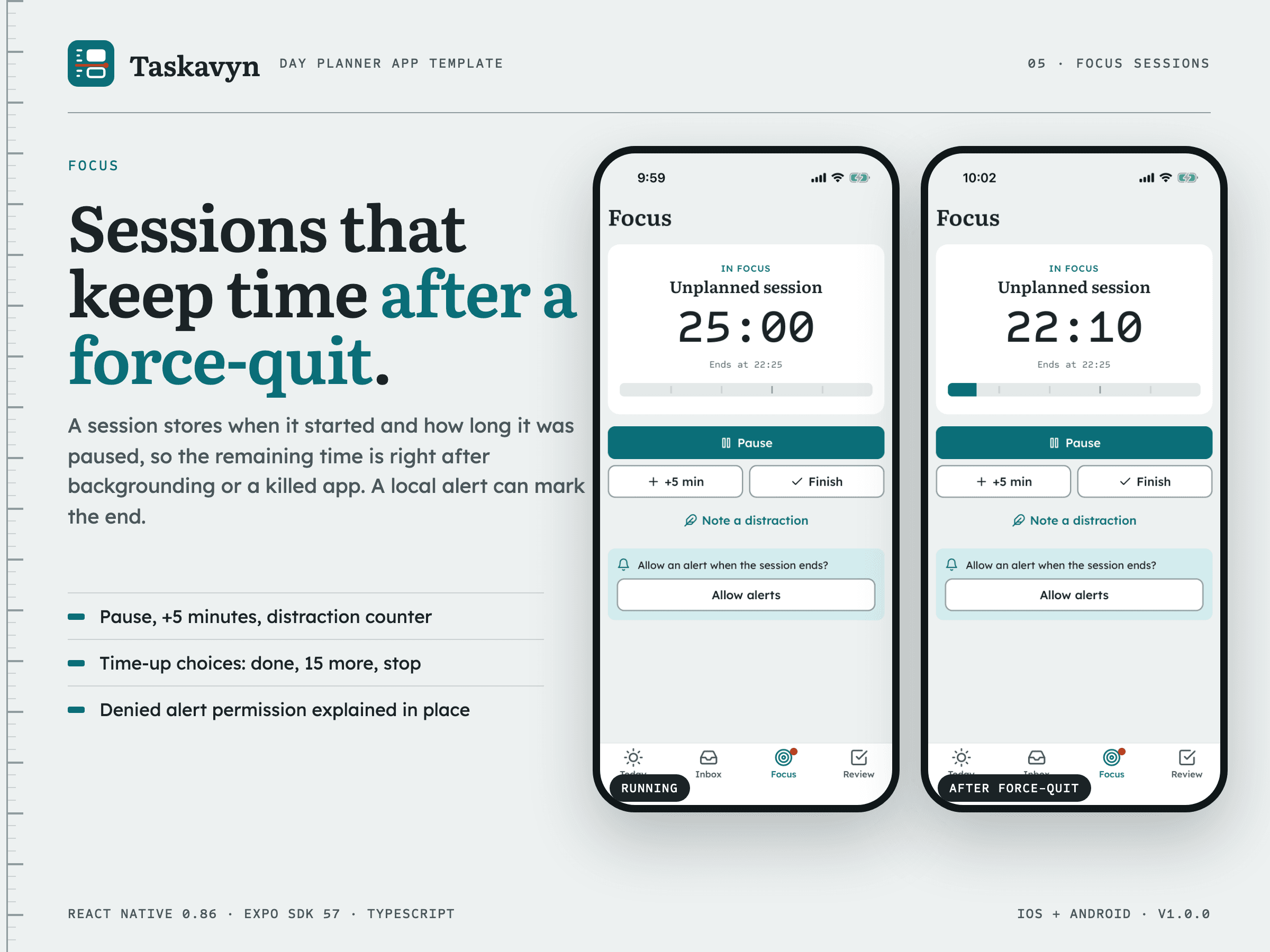
- Focus sessions: Sessions are computed from timestamps, so they keep correct time after the app is backgrounded or closed; pause, +5 minutes, distraction count and time-up outcomes (complete, 15 more minutes, stop) are included. [included-working]
- Local end-of-session alert: When the person allows notifications, a local notification is scheduled on the device for the end of the session; denied and unavailable permission states are explained in the app. No push server is involved. [included-working]
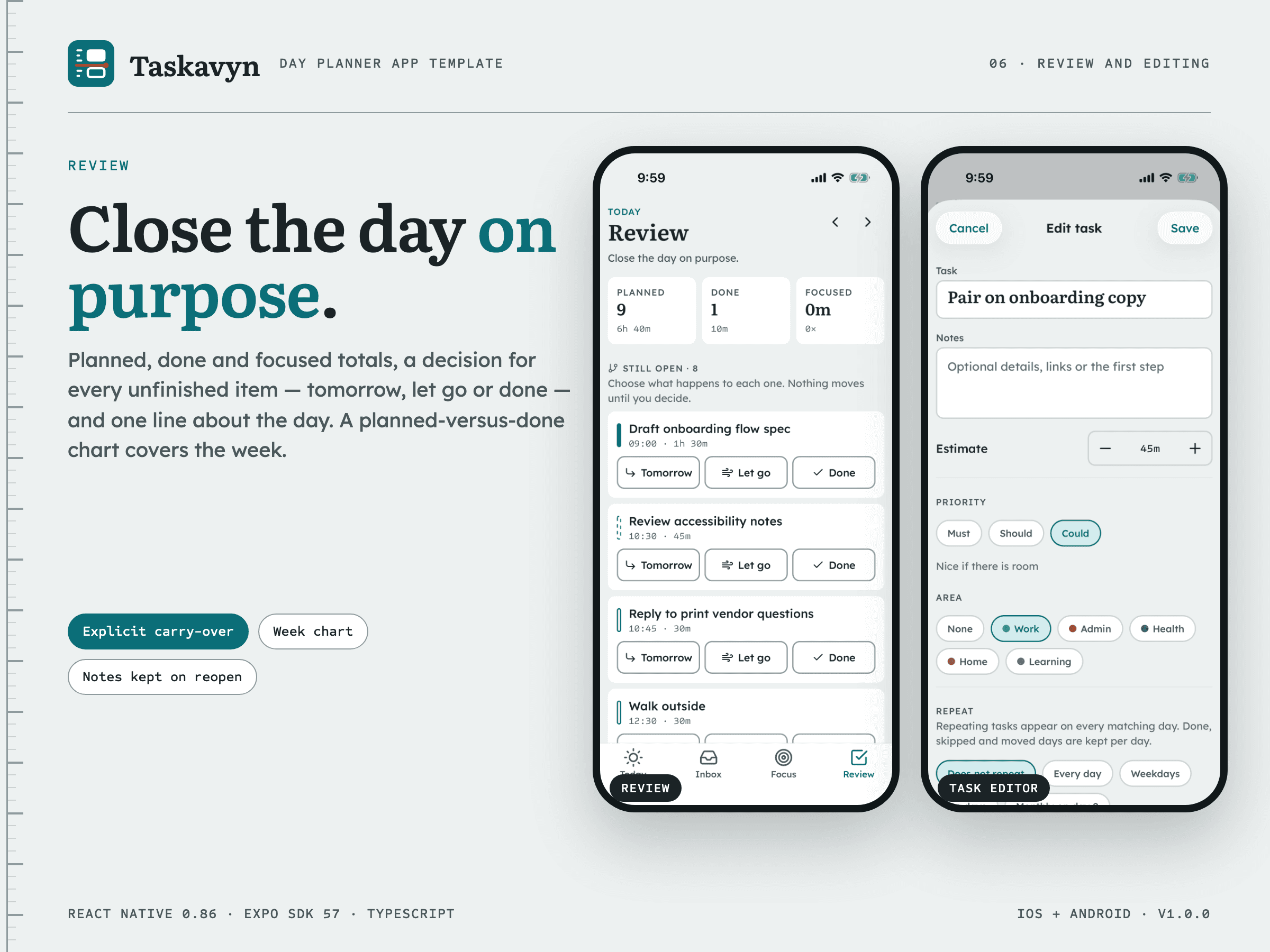
- Day review and week chart: Planned, done and focused totals, a decision for each unfinished item, a one-line note to close the day and a planned-versus-done chart for the week. [included-working]
- On-device persistence: The planner is stored on the device, validated on load, migrated by schema version and kept aside (not destroyed) if it cannot be read. [included-working]
- JSON export, import, demo and erase: Settings exports the planner through the share sheet, imports a validated JSON file after confirmation, loads the fictional demo plan or erases all data. [included-working]
- Deep links: The taskavyn:// scheme opens Today (optionally a date), Inbox, Focus, Review, Settings, a task or the place screen. [included-working]
- Light/dark themes and accessibility semantics: Both themes are defined in one config; controls carry roles, names and states, steppers are adjustable for screen readers, the ruler scales with text size and Reduce Motion removes sheet and block animations. [included-working]
- Central brand configuration: App name, scheme, bundle identifiers, colours, fonts and icon paths come from brand.config.js; npm run icons regenerates every icon and splash image. [included-working]
WHAT WORKS IMMEDIATELY
- Quick capture parser: A local, rule-based parser turns one line (for example "Draft brief 45m !must tomorrow @9:30 #work") into estimate, priority, day, time, area, deadline and recurrence, with a live preview before adding. It is not AI and makes no network call. [included-working]
- Must / Should / Could priorities: Tasks are grouped by priority in the Inbox and marked by shape (solid, outlined, dashed) as well as colour everywhere. [included-working]
- Day time ruler: Placed tasks render as blocks sized by duration on a ruler with 15-minute ticks, a daylight band and a now line; overlapping blocks sit side by side. [included-working]
- Overlap and ran-past handling: Overlapping open blocks and blocks whose time has passed are labelled in words and icons and can be fixed with one tap: next free slot, 15 minutes earlier or later, another time, tomorrow or back to the inbox. [included-working]
- Capacity ruler: The day's planned minutes are measured against a personal focus capacity and, on the current day, against the minutes left, with a projected finish time. [included-working]
- Recurring tasks: Every day, every N days, weekdays, chosen weekdays and monthly (clamped to the month's last day); each day can be done, skipped, moved or placed at its own time without changing the series. [included-working]
- Explicit carry-over: Unfinished one-off work from earlier days is listed until the person moves it to today, tomorrow or the inbox, completes it or lets it go; nothing moves silently. [included-working]
- Focus sessions: Sessions are computed from timestamps, so they keep correct time after the app is backgrounded or closed; pause, +5 minutes, distraction count and time-up outcomes (complete, 15 more minutes, stop) are included. [included-working]
- Local end-of-session alert: When the person allows notifications, a local notification is scheduled on the device for the end of the session; denied and unavailable permission states are explained in the app. No push server is involved. [included-working]
- Day review and week chart: Planned, done and focused totals, a decision for each unfinished item, a one-line note to close the day and a planned-versus-done chart for the week. [included-working]
- On-device persistence: The planner is stored on the device, validated on load, migrated by schema version and kept aside (not destroyed) if it cannot be read. [included-working]
- JSON export, import, demo and erase: Settings exports the planner through the share sheet, imports a validated JSON file after confirmation, loads the fictional demo plan or erases all data. [included-working]
- Deep links: The taskavyn:// scheme opens Today (optionally a date), Inbox, Focus, Review, Settings, a task or the place screen. [included-working]
- Light/dark themes and accessibility semantics: Both themes are defined in one config; controls carry roles, names and states, steppers are adjustable for screen readers, the ruler scales with text size and Reduce Motion removes sheet and block animations. [included-working]
- Central brand configuration: App name, scheme, bundle identifiers, colours, fonts and icon paths come from brand.config.js; npm run icons regenerates every icon and splash image. [included-working]
WHAT NEEDS INTEGRATION
- payments: No payments or in-app purchases. [not-included]
- auth: No accounts or sign-in; the app is single-person and on-device. [not-included]
- email: No email service. [not-included]
- cms: No CMS; content and demo data are TypeScript files. [not-included]
- booking: No calendar or booking service is connected. [not-included]
- orders: No orders. [not-included]
- backend: No backend or sync. Data stays on the device; docs/INTEGRATIONS.md shows where a backend connects. [not-included]
- mlsCrm: Not applicable to this product. [not-included]
WHAT IS NOT INCLUDED
- Accounts and cloud sync: There is no sign-in, server or sync. A storage adapter boundary is documented for connecting one. [not-included]
- Remote push notifications: Only on-device local notifications are scheduled. Remote push needs APNs/FCM credentials and a server that are not supplied. [not-included]
- Calendar sync, widgets and Live Activities: Device calendars, home-screen widgets and Live Activities / Live Updates are not implemented. [not-included]
- Taskavyn and its demo plan are a fictional demo brand and sample data; replace the brand, identifiers and demo data before shipping.
- No App Store or Google Play listing, signing identity or developer account is included; you build, sign and submit the app under your own accounts.
- The live demo is a static showcase of real app captures and install notes; the app itself runs on an iOS Simulator, an Android emulator or a device, not in a browser.
- English interface copy only; multilingual UI and RTL have not been validated.
- No backend: accounts, cloud sync and remote push need your own service; calendar sync, widgets and Live Activities are not included.
- iOS frame pacing is not claimed: an Instruments Animation Hitches trace could not attach on the iPhone (Android hardware frame pacing and iPhone launch time are measured).
CUSTOMIZATION WORKFLOW
- Install dependencies with npm ci and run npm run verify.
- Run the app on an iOS Simulator or Android emulator with npx expo run:ios / run:android.
- Change the name, identifiers, colours, fonts and icons in brand.config.js and run npm run icons.
- Edit copy in src/i18n/en.ts and replace or remove the demo plan in src/data/demo.ts.
- Connect any backend you need through the storage adapter, then sign and submit with your own developer accounts.
DELIVERY AND INSTALL
- taskavyn-v1.0.0.zip · version 1.0.0
Node.js 20.19.4+, 22.13+ or 24.3+ with npm 10+, plus Xcode (iOS) or the Android SDK and a JDK 17+ (Android). Open taskavyn.
Install: npm ci
Build: npm run verify, then npx expo run:ios or npx expo run:android
Lockfile: package-lock.json. Package manager: npm.
LICENSE
LICENSE — Webloomery Template License v1.0 (effective 26 September 2026)
- One purchase, one end product: build one website or application for yourself or for one client.
- Modify the source for that end product. Its development, staging and production copies count as one end product.
- Team members and contractors on that end product may use the files, only for it.
- You may hand the finished project and the customized source it needs to that one client; the Template is then not reused for anyone else.
- Each additional website, application, end product or client needs another purchase.
- Not allowed: reselling, sharing, sublicensing or publicly publishing the Template source; turning it into a template, builder, code generator or reusable client-production system; reselling its components or assets separately.
- Third-party fonts, photographs and other assets keep their own licenses, listed in ASSET-CREDITS.md.
- Support and updates are separate from the license.
The full license text is included as LICENSE.txt in the download and published at https://webloomery.com/legal/license.
SUPPORT BOUNDARY
- Package installation and the documented app behaviour.
- Questions about the source map, rebranding and native build steps in the included docs.
Excluded: Custom development, backend or sync implementation.; App Store / Google Play account setup, signing identities and store review.; Third-party service configuration..
No guaranteed response time.
No fixed support period is promised.
ASSET CREDITS
No stock photography, illustrations or AI-generated images. The app icon, adaptive icon, splash, favicon and notification icon are generated by scripts/generate-icons.mjs from the original Taskavyn ruler mark and the brand colours. Literata, Lexend and Sometype Mono (SIL Open Font License 1.1), Feather icons (MIT) and the npm dependencies keep their own licenses.
Read ASSET-CREDITS.md. Third-party materials retain their own licenses. Demo brands and content must be replaced before launch.